Blender - Setup Blender for Unreal

How to setup Blender for use with Unreal
Install PROTO Game Asset Tools (Add-On)
Blender's default FBX Exporter has problems with Unreal. It is highly recommended to use this add-on
This add-on is by the author of kemorig, and is designed for working with Unreal. It exports FBX files properly for Unreal, and comes with extra goodies for improving Blender’s character workflow.

PROTO Game Asset Tools
Blender Extensions
If you need help installing this extension, see this guide.
Set Length Units to Centimeters (Optional)
In Unreal, 1 unit equals 1 centimeter. It’s convenient to also use centimeters in our scene.
In Blender, on the right side of the screen, find Scene Properties > Units and set Length to Centimeters.
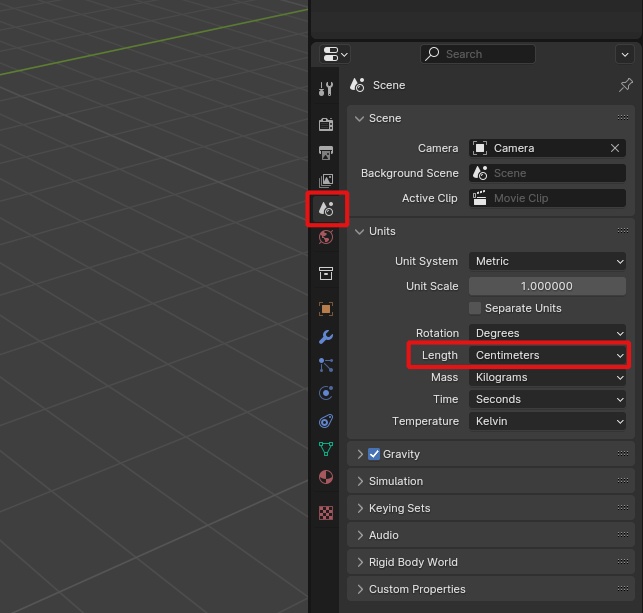
Do not adjust the Unit Scale parameter, which is 1.0 by default. Some outdated online tutorials recommend adjusting it for Unreal. Do not do this.
Scene settings are saved per .blend file. You will need to make this adjustment each time you make a new file in Blender.
Other Blender Add-Ons
Recommended
- Contains FBX exporter that works with Unreal (or you can export AutoRig characters with PROTO Game Asset Tools)
- Great character rigging tool, will help you rig characters faster
- Relatively expensive for hobbyists, but high quality
- If you need to convert VRM files for Blender/kemorig, use this add-on
- Note that you will not want to use most features of this add-on for kemorig characters -- just use it as an importer to Blender
Not Recommended
- Epic has stopped supporting it
- Does not fix FBX issues with Unreal
Differences with Unreal
For extra information about differences in coordinate system and bones between Blender and Unreal, see this page:

Blender - Differences with Unreal
Extra information about differences between Blender and Unreal